Identify the owner and then change the owner of a SQL Agent Job
In this post and video, you will learn how to identify the owner and then change the owner of a SQL Agent Job.
Have you ever had issues where the owner of a SQL Agent job leaves and their windows active directory account gets deleted/removed/disabled and the job(s) they own then stops working?
I was doing some SQL Server security work for a client recently. Part of that process involved changing the authentication mode of SQL Server from Mixed Mode to Windows only, disabling the built in SA account and locking things and removing components not used to reduce the surface area.
This process involved cleaning up old logins but some of the logins I wanted to remove were the owner of some SQL Agent jobs that were still needed and executing on a schedule. I needed to change the SQL Agent job owner for these jobs.
There is an argument for setting all jobs to be owned by SA, you might have a different approach such as creating an account or login specifically for owning SQL Agent jobs – whatever approach you take you might want to avoid having jobs owned by users – if the users leaves the job might just unexpectedly stop working
The first thing I wanted to do was identify all the jobs on the instance and their respective owners – allowing me examine the problem
List job name and owner
The following query return the owners of a SQL Agent Job. It’s a join query getting data from the msdb.dbo.sysjobs system table and the DMV sys.server_principals
SELECT J.nameAS Job_Name
, P.nameAS Job_Owner
FROM msdb.dbo.sysjobs J
INNERJOIN
sys.server_principals P
ON J.owner_sid = P.sid
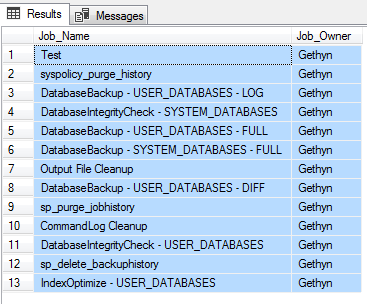
You can see from the results below that the owner of my all my jobs is a login called Gethyn
Just in case Gethyn leaves, or I need to move the job to another server which doesn’t have a login called Gethyn on it or its created with a different SID to the current server I want to change all these jobs to be owned by SA
Updating the SQL Agent job owner
There is stored procedure in MSDB that allows you to change the attributes of Agent jobs including updating the SQL Agent job owner. The stored procedure is called SP_UPDATE_JOB.
A Script to Create a Script
The next script is going to generate a script that is going use the SP_UPDATE_JOB stored procedure to change the job name.
I could wrap this in some dynamic SQL but I want to check my script manually before I execute the script. It will also give me some documentation as to what I have changed too.
It’s a SELECT statement that concatenates the TSQL needed to execute SP_UPDATE_JOB and passes some of the values of a SELECT from the first query above, providing a final statement to change the job owner of the jobs to SA.
Before executing the below I change the query result output to be text (not grid) then execute the query
SELECT‘exec msdb..sp_update_job
@job_name = ”’+j.name+”’,
@owner_login_name = ”sa”
;’
FROM msdb.dbo.sysjobs J
INNERJOIN
sys.server_principals P
ON J.owner_sid = P.sid
Execute the query select all the text in the result pane to text in management studio, take the results of the query and paste into a new query window. Execute the script pasted into the new query window to rename the necessary jobs.
This website uses cookies to improve your experience. We'll assume you're ok with this, but you can opt-out if you wish. Cookie settingsACCEPT
Privacy & Cookies Policy
Privacy Overview
This website uses cookies to improve your experience while you navigate through the website. Out of these cookies, the cookies that are categorized as necessary are stored on your browser as they are essential for the working of basic functionalities of the website. We also use third-party cookies that help us analyze and understand how you use this website. These cookies will be stored in your browser only with your consent. You also have the option to opt-out of these cookies. But opting out of some of these cookies may have an effect on your browsing experience.
Necessary cookies are absolutely essential for the website to function properly. This category only includes cookies that ensures basic functionalities and security features of the website. These cookies do not store any personal information.
Any cookies that may not be particularly necessary for the website to function and is used specifically to collect user personal data via analytics, ads, other embedded contents are termed as non-necessary cookies. It is mandatory to procure user consent prior to running these cookies on your website.

Very nicely presnted and helpful. Thank you !
I'm glad you found it useful Richard.