
At Microsoft Ignite 2026 I sat down at a round table on Copilot value. By the time I left the table I had spoken to ten people who would be interested in the work I do, and several of them had asked for my contact details and my LinkedIn profile so we could talk properly afterwards.
That one session explains why Ignite is the best conference I have been to, and why I will be back next year.
Why Microsoft Ignite 2026 was different
I go to conferences wearing two hats, and they want different things.
As a technical person, conferences are a place to learn. More and more, though, the sessions are not for me. I learn by doing, not by listening. I might pick up an idea or two in a breakout, but I only get real value when I can break something and fix it.
As a business owner, I want to meet people who will buy my services. At some technical conferences nobody in the building will ever buy. The benefits are indirect: you establish credibility and you stay visible. That is worth having, but it is not the same as a conversation with someone who has a budget and a problem.
Ignite had those people. There were attendees who need an AI enablement programme or a data platform upgrade programme, and I got to talk to them directly.
My session: Can You Trust Your Fabric Data Agent? Test It and Prove It
I delivered the same session three times across the week: a lightning talk on day 1, a repeat lightning talk on day 2, and a table talk on day 3.
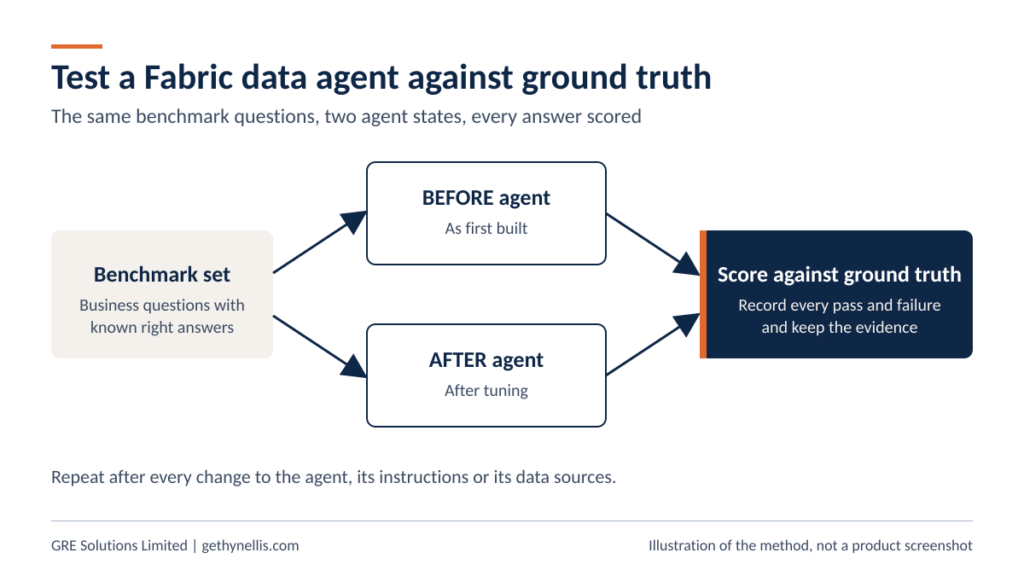
The argument is simple. A Fabric data agent can give you an answer that sounds convincing without that answer being correct. So before you trust one, you test it against questions where you already know the right answer, and you keep the evidence.
The lightning talk was a recorded demo that I narrated live. It showed two Fabric data agents side by side, a BEFORE state and an AFTER state. Every benchmark question was scored against a ground truth answer, and the agent’s real failures were on screen. A demo that only shows the right answers proves nothing. The failures are the point, because they are what your business users will hit on day one.
A full room and a hallway Q&A
The first talk was a full session, with about 30 people in. The second was well attended too. The questions were excellent, but 15 minutes is a tight slot, so most of the discussion happened in the hallway afterwards. Three questions kept coming up:
- Security. Can the agent respect different roles? Does it pass through the user’s identity? If someone has access to the agent but not to the underlying data source, will it still answer?
- Scope. How many agents do you need? Is it one per department, or many? Should each one have a very specific job?
- Testing. How should you test the agent?
People have moved past asking whether to use data agents. They are asking how to trust them, which is the right question.
The morning Fabric wobbled
About an hour before my second session, reports started coming in that Fabric was unavailable. I will admit I got a bit scared. But I had the demos recorded, so I was fine. [CHECK: confirm whether you ran the demo live or used the recording on Wednesday.]
If you ever present to an audience or a board, record the demo first. It costs you an hour and it can save the session.
The table talk: why security dominated
The table talk went very well, and it did not go where I expected. I went in to talk about whether an agent’s answers are right. The room wanted to talk about who can see what.
Round the table were people from finance, health, construction and tech. They shared one worry: oversharing. They were concerned about people getting access, through an agent, to data they should never have had.
My position is this. According to Microsoft’s documentation on data agent sharing and permissions, a Fabric data agent queries the data using the identity and permissions of the person asking. Sharing an agent with someone does not give them access to the data underneath it, and row-level and column-level security still apply.
So the agent is not the hole in the fence. The risk is the access you have already granted and forgotten about. An agent makes years of over-permissioning very easy to find, because all anyone has to do is ask a question.
Security and accuracy are both trust questions, and security comes first. Nobody will sign off an accurate agent that exposes data to the wrong people.
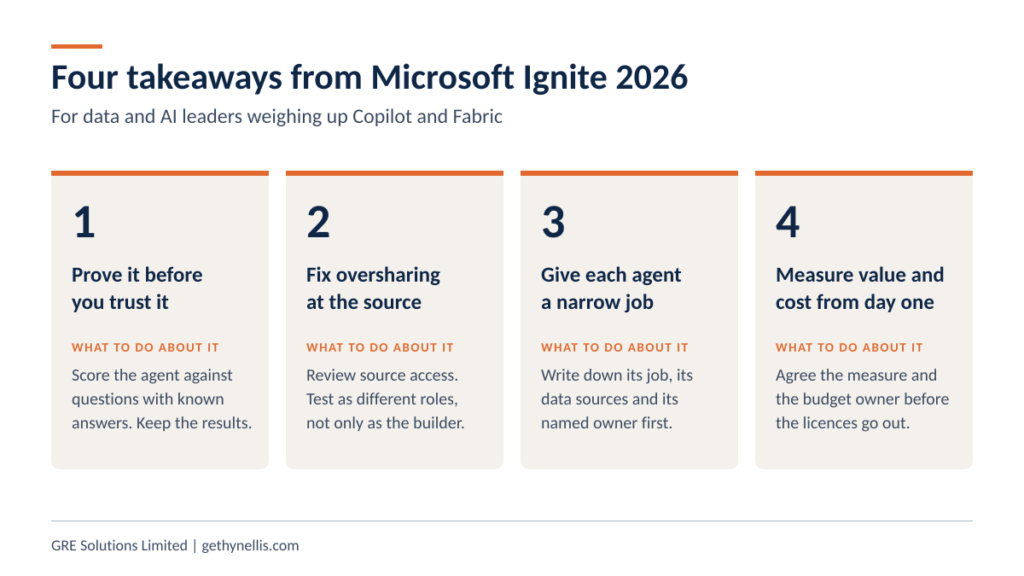
Four takeaways for data and AI leaders
1. Prove it before you trust it
Microsoft says in its own guidance that Fabric data agents are not intended for cases where deterministic, 100% accurate results are required. That makes testing part of the job, not an optional extra.
What to do about it: write a benchmark set of business questions where you already know the right answer. Score the agent against it before go-live and again after every change, and keep the results. Microsoft’s evaluation tooling for data agents supports this approach. [CHECK: listed as preview at the time of writing.]
2. Fix oversharing at the source
The agent respects the permissions you give it, so the permissions are where the work is.
What to do about it: review who has access to the lakehouses, warehouses and semantic models behind the agent before you share it. Then test the agent as different user roles, not only as the person who built it, who usually has the widest access of anyone.
3. Give each agent a narrow job
The ‘how many agents’ question has no single number for an answer. What matters is scope. An agent with a specific job and a defined set of data sources is easier to test, easier to secure and easier to trust than one agent that tries to answer everything.
What to do about it: before you build an agent, write down its job, its data sources and its named owner. If you cannot describe the job in a sentence, it is probably two agents.
4. Measure value and cost from day one
The Copilot value round table and the keynote pointed the same way. Leaders want evidence of return and visibility of spend. The keynote put observability front and centre, with new Agent 365 tooling to show what AI is costing you and what it brings back. [CHECK: Business Analytics and Cost Management availability.] It also introduced Autopilot, a personal AI assistant that is rolling out through the Frontier programme. [CHECK: no general availability date at the time of writing.] The more of these assistants and agents you run, the more the cost question matters.
What to do about it: agree how you will measure value, and who owns the budget, before the licences go out. Licences are easy to count. Changed working habits are not.
Why I will be back
I brought my family to Ignite. My wife works in the business too and I needed her there, which meant the little ones came as well. Having them with me was amazing, and it made a trip halfway around the world worth it. It is the best work trip I have ever been on.
Add the new friends, some great attendees and some potential new clients, and I already know where I will be this time next year.
If you want the detail as it happened, the full live blog is here: day 1, the keynote, day 2, data and agents, and day 3, Copilot adoption and security.
Put this into practice: December Copilot workshops
A conference gives you a long list of announcements. It does not give your team the skills to use them, or the confidence that what they build can be trusted.
On 14 and 15 December 2026 I am running half-day Copilot workshops that turn this week’s announcements into working practice your people can use the next morning, including the security and trust questions that came up all week at Ignite.
0 Comments