
How to Write SQL Queries | Retrieve Data From Multiple Tables | Outer Joins
In this post, we are continuing with our How to write SQL queries series but things are starting to get a little more complicated in the code we write. Instead of retrieving data from a single table, we are now going to look at retrieving data from multiple tables. We are going to tackle JOINS.
How to Write SQL Queries – Previous Articles
You will find all the previous articles in the series here:
- Database fundamentals – How to Write SQL Queries series. In this post, we discuss why it’s important to understand the database design and schema and talk about some basic database fundamentals
- Simple SELECTS – How to Write SQL Queries series. In the second post, we look at how to write a SELECT statement from a single table
- Column Expressions – How to Write SQL Queries series. We look at column expressions, aliases
- Filter with WHERE – How to Write SQL Queries Series. We will learn how to filter rows returned by our SELECT statement
- Using LIKE for Wildcard searches – How to Write SQL Queries – We look at using LIKE for wildcard searches.
- Using ORDER BY to sort our results We look at sorting the data returned by our query
- Understanding NULLs – In this post in this series we talk about NULLs and how to handle them
- Inner Joins – The most common type of join, we discuss how tp retrieve data from more than one table in the same Query
The SELECT Statement Syntax
In previous posts, we have been focusing on the SELECT Syntax. In this post we are going to look at JOINS and OUTER JOINS in particular
SELECT <Column>,...,<Column> | *

FROM <table> [JOIN <table> ON <join condition>]

WHERE <filter condition>

GROUP BY <column>,...,<column>

HAVING <filter condition>

ORDER BY <column>,...,<column>
Revisiting Inner JOINS
In the previous post where we discussed inner joins, we said that an inner join will return rows where a match is made on the JOIN condition. So if we revisit the query that returned customer and order data
Where there is a match on the condition the columns from the tables are included in the result if there is no match the rows are not returned
-- Combined with a JOIN

SELECT SalesLT.Customer.CustomerID

,SalesLT.Customer.Title

,SalesLT.Customer.FirstName

,SalesLT.Customer.LastName

,SalesLT.SalesOrderHeader.SalesOrderID

,SalesLT.SalesOrderHeader.CustomerID

,SalesLT.SalesOrderHeader.TotalDue

FROM SalesLT.Customer

INNER JOIN SalesLT.SalesOrderHeader ON SalesLT.Customer.CustomerID = SalesLT.SalesOrderHeader.CustomerID
So running the above query returns 32 rows. Every customer who has an order in the orders table is returned along with the columns from the order tables
What if we wanted to list all customers regardless of whether they had an order but inlucde the order data if it exists? To answer that we need an OUTER JOIN
Retrieve Data From Multiple Tables | Outer Joins
When we write our JOINS if we to specify if one table should return all data regardless if match in the join condition we would need to use an OUTER JOIN
There are three different types of OUTER JOIN, LEFT, RIGHT, and FULL
LEFT OUTER JOIN
The syntax for a LEFT join is as follows
tables1 LEFT OUTER JOIN table2
This means that table 1, which is to the left of the JOIN keyword is the most important table, sometimes you might see this referred to as the driving table, we want all rows returned from table1 including all those that have no match in table2.
RIGHT OUTER JOIN
The syntax for a RIGHT OUTER JOIN is as follow
table1 RIGHT OUTER JOIN table2
This means that the table2 is the most important table or the driving table. It is the table to the RIGHT of the JOIN keyword. Table1 is the driven. All rows from table2 will be returned regardless of a match in table1
Just a note
Table1 RIGHT OUTER JOIN table2
is the same as
Tables2 LEFT OUTER JOIN Table 1
FULL OUTER JOIN
The syntax for a FULL OUTER JOIN is as follows
table1 FULL OUTER JOIN table2
With a full outer join we are saying that both tables are equally important all rows from each table will be included in the result set, regardless of a match on the JOIN condition
Outer Join Examples
So let’s take the inner join above and change it so we can answer the question which of our customers do not have an order in the order tables
We can change the query into an outer join and add a test for NULLs on a column in the driven that would not allow NULL values, in this case the primary key column, in the WHERE clause to help us get the data we want to be returned.
I have also updated the code to use aliases – it is easier to understand after all
SELECT C.CustomerID

,C.Title

,C.FirstName

,C.LastName

,S.SalesOrderID

,S.CustomerID

,S.TotalDue

FROM SalesLT.Customer AS C

LEFT OUTER JOIN SalesLT.SalesOrderHeader AS S

ON C.CustomerID = S.CustomerID

WHERE S.SalesOrderID IS NULL

You can see we have 815 customers with no order in the orders table.
If we wanted to find out if we had orders without customers – This wouldn’t be possible because of the database referential integrity, when entering an order you would need to enter a valid customer, but this could be used to find data quality issues too we could switch the LEFT JOIN TO a RIGHT JOIN and change the WHERE Clause
SELECT C.CustomerID

,C.Title

,C.FirstName

,C.LastName

,S.SalesOrderID

,S.CustomerID

,S.TotalDue

FROM SalesLT.Customer AS C

RIGHT OUTER JOIN SalesLT.SalesOrderHeader AS S

ON C.CustomerID = S.CustomerID

WHERE C.CustomerID IS NULL
As expected this query doesn’t return any rows.
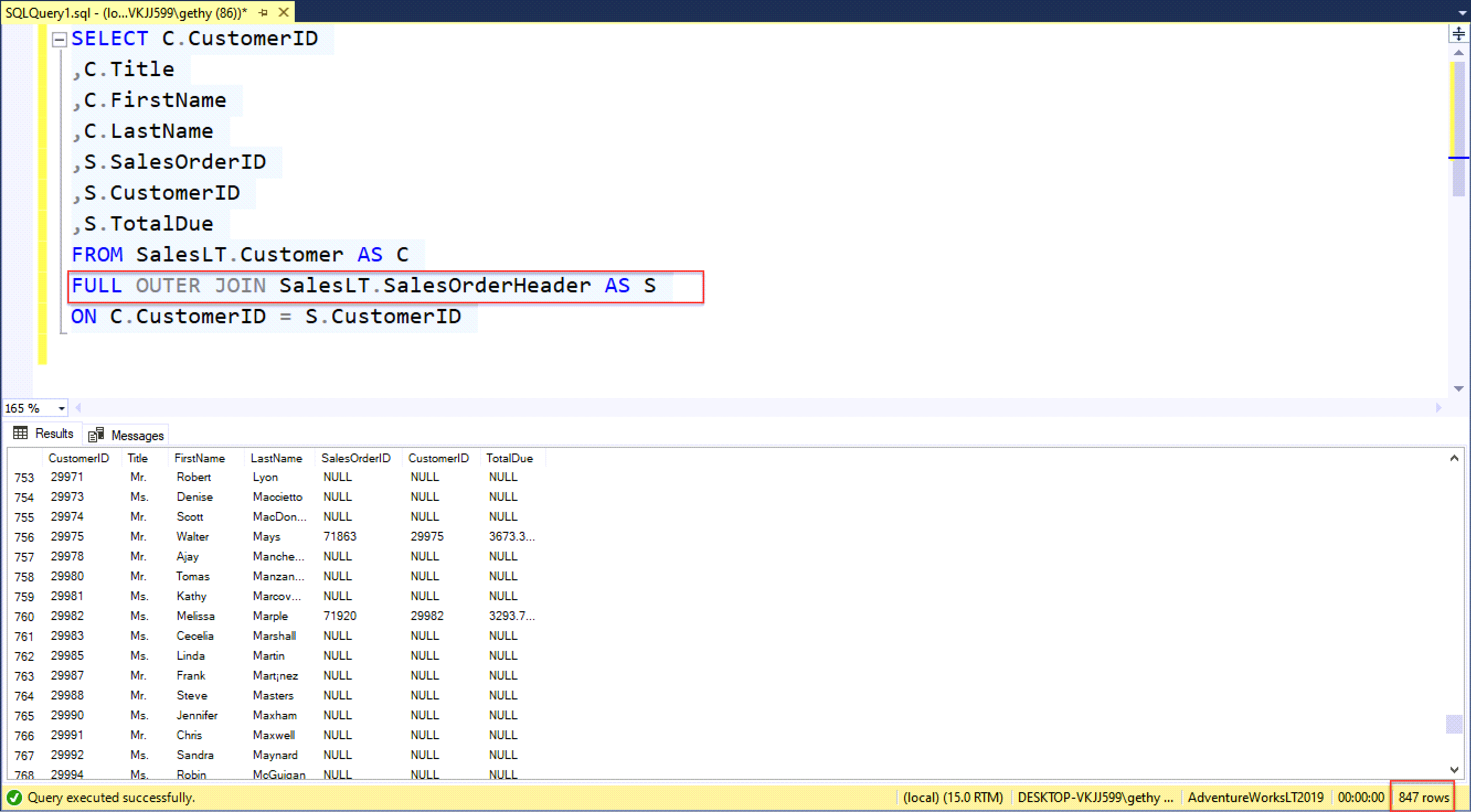
Finally, if we want to return all rows from customers and orders regardless of whether we have a match we can use a FULL OUTER JOIN
SELECT C.CustomerID

,C.Title

,C.FirstName

,C.LastName

,S.SalesOrderID

,S.CustomerID

,S.TotalDue

FROM SalesLT.Customer AS C

FULL OUTER JOIN SalesLT.SalesOrderHeader AS S

ON C.CustomerID = S.CustomerID
This is the same result, by coincidence as the left join result, We return 847 rows

Other Useful Information
If you are interested in attending some formal training check out our Writing SQL Queries training page. If you would like to speak to us directly please use this contact form below:
Summary
In this post, we have looked at retrieving data from multiple tables using an OUTER JOIN. Outer joins can have a number of uses including find rows that exist in one table and not the other and then you can use that to do an incremental load of data. You can see an example of an incremental load in this blog post that I wrote back in 2010
Useful Links
How to Write SQL Queries – Simple Single Table SELECT Queries
A LinkedIn POD – Do you want to join our LinkedIn Community ?
0 Comments