
Mapping the Microsoft Agentic AI Stack: What to Use, When, and How the Pieces Fit Together
For two years, Copilot has been pitched as the assistant sitting next to your work. Over the past two years, that ecosystem has been evolving. That framing is now too narrow. Microsoft’s product direction has shifted from “assist a user with a task” to “act on a user’s behalf across multiple steps”, and that change affects both the build options and the governance questions you need to answer.
What “agentic” actually means
An agent, in the Microsoft sense, is a system that perceives context, plans a sequence of steps, calls tools or data sources, and completes multi-step work with limited human oversight. It may be triggered by a person in a chatbot (“draft me a board update”) or by an event (“a high-priority case has landed in the queue”). What separates an agent from a Copilot prompt is the planning loop and the ability to act, not just respond.
Where you build agents in the Microsoft stack
I was working with a City client last week on their Copilot rollout, exploring how agents could push productivity further. It became clear to me, due to the various ways agents are marketed and where they can be created I thought it might be worth noting down where they sit in the overall Microsoft ecosystem.
1. Microsoft 365 Copilot and Agent Builder
Who it’s for: end users and business teams inside Microsoft 365 Copilot.
What it does: Agent Builder lets a non-technical user describe an agent in natural language inside Copilot Chat, attach SharePoint sites or files as knowledge, and add API plugin actions via OpenAPI specs. Output is a declarative agent: instructions, knowledge, and actions, no autonomous behaviour. New in 2026: MCP-based actions and interactive UI widgets that render inline in Copilot Chat.
Where it runs: inside Microsoft 365 Copilot. The Copilot orchestrator does the heavy lifting; no separate hosting.
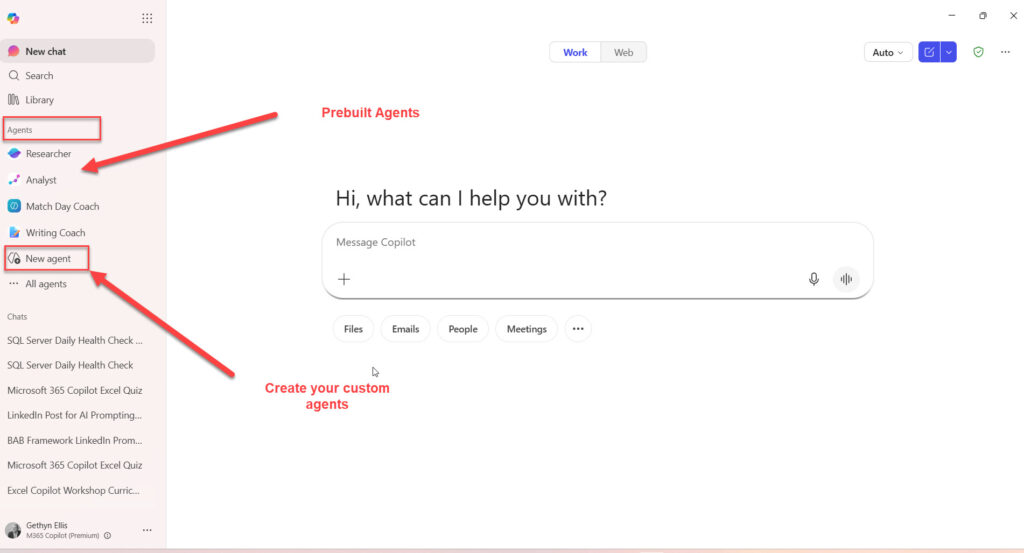
Example: an onboarding agent grounded in your HR SharePoint that answers questions about benefits, leave policy, and the joiner checklist.
Commercial model: agents are usable inside Copilot Chat (included with most Microsoft 365 plans) with usage paid through Copilot Credits at the tenant level. Microsoft 365 Copilot licensed users (around £24.70 per user per month, billed annually) get richer Graph grounding and unlimited internal use without consuming tenant credits.
2. Copilot Studio
Who it’s for: citizen developers, business analysts, and Power Platform makers who need more than Agent Builder offers.
What it does: builds both declarative and autonomous agents. Sits on top of Dataverse, connects to 1,400+ Power Platform connectors, and lets a maker stand up a working agent in an afternoon, no Python required. Publishes to Microsoft 365 Copilot, Teams, your website, WhatsApp, or any custom channel. Autonomous agents are triggered by events (a new email, a record change, a scheduled time) and can take action without a user in the loop.
Where it runs: Power Platform / Dataverse.
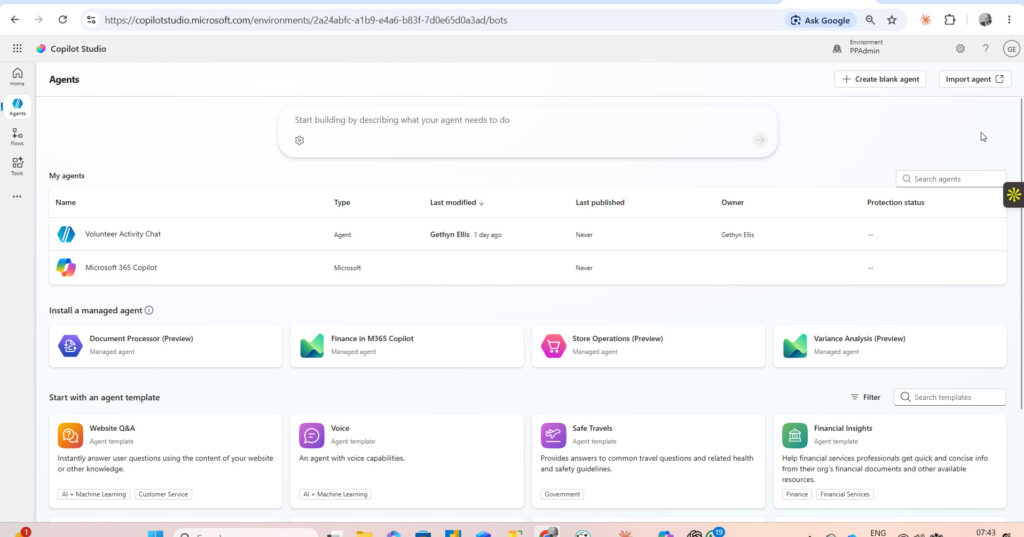
Example: a procurement agent triggered when a purchase request hits Dynamics 365, that checks the budget, generates a supplier quote summary, and routes to the right approver.
Commercial model: changed in September 2025 from per-message billing to Copilot Credits. Three paths: included free for internal use by Microsoft 365 Copilot-licensed users, prepaid capacity packs at $200 per month for 25,000 credits, or pay-as-you-go at $0.01 per credit via Azure. Autonomous triggers consume 25 credits each regardless of licence. As of April 2026, prepaid packs no longer require an Azure subscription as fallback.
3. Microsoft Foundry and Foundry Agent Service
Who it’s for: pro-code developers and platform teams building agents with custom models, custom tools, and enterprise-grade governance.
What it does: designs, hosts, and orchestrates AI agents at scale. Picks from 11,000+ models in the Foundry catalogue, supports custom tools, and integrates with Microsoft Fabric, SharePoint, Azure AI Search, Grounding with Bing, and 1,400+ Logic Apps connectors. Multi-agent orchestration runs through Semantic Kernel and Microsoft Agent Framework, with interoperability via the Agent2Agent (A2A) protocol. Azure AI Foundry was rebranded “Microsoft Foundry” during 2025/2026; both names still appear across documentation.
Where it runs: Azure.
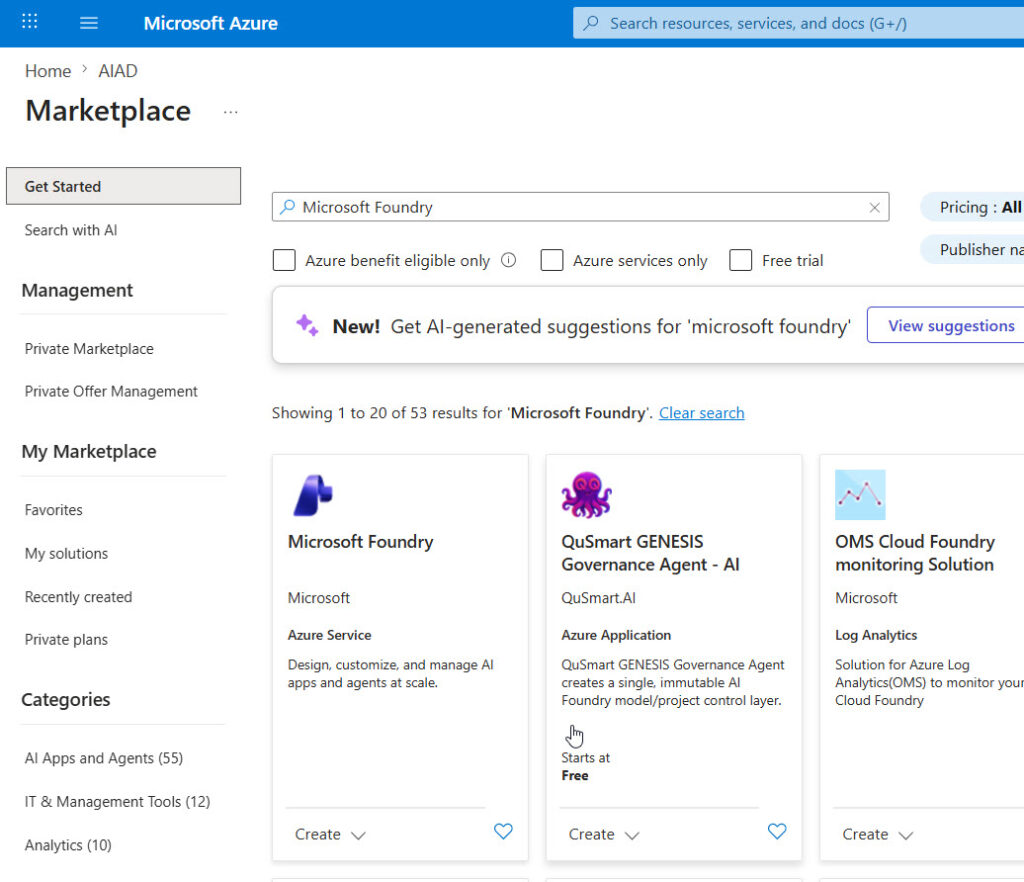
Example: a customer service agent that orchestrates three sub-agents (case classifier, knowledge retrieval, response drafter), using a fine-tuned Phi-4-mini for cheap classification and GPT-4.1 for drafting, with every call logged.
Commercial model: no charge for the Foundry Agent Service itself. You pay for model tokens, tools, and knowledge connections separately. Hosted agents running external frameworks (LangGraph, Microsoft Agent Framework) sit in customer-dedicated containers, billed via Agent Compute Units (ACUs).
4. GitHub Copilot agent mode and coding agent
Who it’s for: software engineering teams.
What it does: agent mode runs an autonomous multi-step loop inside the IDE (Visual Studio Code, JetBrains, Visual Studio). It reads the codebase, edits files, runs terminal commands, and iterates on errors. The coding agent goes further: assign a GitHub issue to Copilot and it works in the background, writes code, runs tests, and opens a pull request. Both reached GA across major IDEs in March 2026.
Where it runs: in the IDE for agent mode, on GitHub infrastructure for the coding agent.
Example: a developer assigns a bug ticket to Copilot before lunch, and returns to find a pull request with a candidate fix and tests, ready for review.
Commercial model: per-user subscription. Free, Pro at $10 per user per month, Pro+ at $39, Business at $19, Enterprise at $39. Agent mode and the coding agent draw on a monthly allowance of “premium requests”; heavy users move up the tier.
5. Power Automate with Copilot and AI Builder
Who it’s for: process automation teams that want flows to be invoked as agent tools, or that want flows themselves to use AI capabilities.
What it does: builds automation across 1,400+ connectors, with Copilot helping authoring inside Power Automate. AI Builder adds OCR, form processing, document understanding, prediction, and prompt-driven generative steps. Crucially, flows can be exposed as actions to Copilot Studio and Foundry agents, becoming reusable tools in an agent’s toolkit.
Where it runs: Power Platform.
Example: a Copilot Studio agent that, on a new customer complaint, calls a Power Automate flow which extracts invoice data using AI Builder and writes the result back to Dynamics.
Commercial model: Premium (formerly per-user attended RPA) and Process (formerly per-flow) plans. AI Builder credits are being consolidated into Copilot Credits from November 2026; budget for the new rates.
6. Security Copilot and other role-based Copilots
Who it’s for: pre-built vertical agents for specific roles. Security Copilot is the most mature example.
What it does: Security Copilot is a pre-built agent for SOC analysts, embedded in Microsoft Defender, Entra, Intune, Purview, and Sentinel, with a standalone portal alongside. Microsoft has shipped 12 first-party security agents (alert triage, conditional access optimisation, vulnerability remediation, and others). Custom security agents can be built via Agent Builder in the Security Copilot portal. Other role-based Copilots include Copilot for Sales, Service, and Finance, sitting on Dynamics 365.
Where it runs: Microsoft Security and Microsoft 365 estates.
Example: a phishing investigation agent that, on a flagged email, summarises the chain, identifies lateral movement, and recommends containment actions, all from a single prompt.
Commercial model: standalone Security Compute Units (SCUs) at $4 per hour provisioned, $6 per hour overage. As of November 2025, Security Copilot is included with Microsoft 365 E5: 400 SCUs per month for every 1,000 paid E5 user licences, capped at 10,000 SCUs per month. The E5 inclusion does not currently overage-bill; analysts get throttled if the allocation is exhausted. Microsoft 365 E7 (GA 1 May 2026, $99 per user per month) bundles E5, Copilot, Entra Suite, and Agent 365, and carries the same Security Copilot entitlement.
How to choose
The right starting point comes down to three things: who will build, what data the agent needs, and how much autonomy you want.
- End user who wants a quick agent grounded in Microsoft 365 data, no autonomy: Agent Builder inside Microsoft 365 Copilot.
- Citizen developer or business analyst, needs autonomous triggers, Microsoft 365 / Dynamics / Power Platform data: Copilot Studio.
- Pro-developer, custom models, external data sources, multi-agent orchestration: Microsoft Foundry / Foundry Agent Service.
- Software engineering team, agent inside the development workflow: GitHub Copilot agent mode and the coding agent.
- Process automation already in place, want to expose it to agents as tools: Power Automate flows registered as agent actions.
- Security operations: Security Copilot, and use your E5 SCU allocation before buying standalone capacity.
These options are not interchangeable. An agent built in Agent Builder cannot do what a Foundry Agent Service agent does. The orchestrator, the data plane, the governance model, and the licensing are all different. Pick the layer that matches the maturity of your build team and the autonomy your use case requires.
Governance and guardrails
Agentic AI introduces governance questions that conventional Copilot did not. An agent that can take action, that is, trigger flows, update records, send emails, needs the same controls you apply to any automated system, plus several new ones.
- Microsoft Purview extends to agent activity. Sensitivity labels, DLP policies, and audit logging cover agent prompts, responses, and tool calls. Agent 365 (GA 1 May 2026) brings Entra-based identity, Purview governance, and Defender threat protection to AI agents as a managed product.
- Data residency: every agent sits in a tenant or an Azure region. Confirm where prompts, responses, and grounding data are processed before exposing PII or regulated data.
- Role-based access: agents inherit the identity of the user invoking them in attended mode. In autonomous mode they run as a service principal with explicit permissions. Apply least privilege and review what the agent can do, not just what it has been asked to do.
- Human-in-the-loop: declarative agents respond to a user, and the user is the loop. Autonomous agents run without a user, so the loop has to be engineered in: an approval step, a review queue, or a confidence threshold below which the agent escalates. Build the loop before you go live.
- Declarative vs autonomous: the single most important distinction for governance. A declarative agent is bounded by the user prompt; output is reviewable in the chat. An autonomous agent is goal-driven, event-triggered, and may take action across multiple systems before a human sees the result. Different risk model, different review cadence, different controls.
The CIO, data and AI leadership question is not “are we governing our agents”. It is “what is the catalogue of agents running in our tenant, who owns each one, what can each touch, and how do we know it did what we expected?” data and AI leadership support
Where to start
A practical sequence if you are trying to work out where to start:
- Pilot Agent Builder inside Microsoft 365 Copilot with one business team. Two weeks. One agent grounded in a SharePoint site. Learn what “good” looks like.
- Stand up a Copilot Studio centre of excellence with one citizen developer per business unit. Three months. Five agents. Establish a credit budget and a publishing approval process.
- Bring in a pro-dev team on Foundry for the one or two high-value agents that justify custom models, external data, or multi-agent orchestration.
If you’d like a walkthrough of where to start, the agent design patterns we use with clients, and a governance model for your CIO, book an AI Readiness Assessment or an agentic AI workshop.
Useful Links
0 Comments