
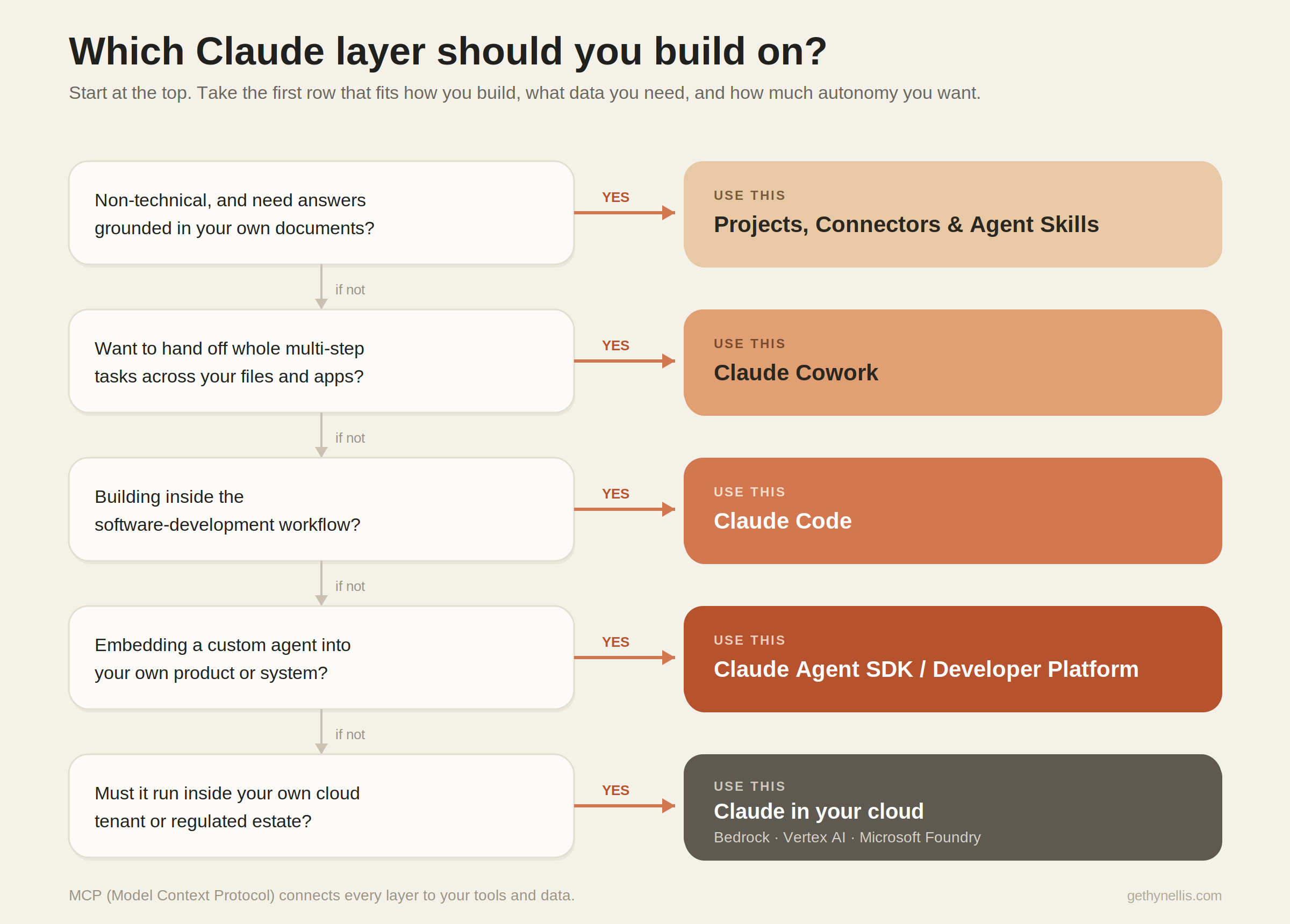
The Claude Agentic AI Stack: Where to Build AI Agents with Claude
I have been having more and more conversations with clients over the last few weeks. . A team tells me they want “Claude agents”, and when I ask where they expect those agents to live, the room goes quiet. It is a fair question to be stuck on. Most people meet Claude as a chat window in a browser, so the assumption is that an agent is just that chat window with a job description bolted on.
It is not. Just as Microsoft has spread agent-building across Agent Builder, Copilot Studio and Foundry, Anthropic now has its own stack of places to build with Claude, each with a different builder, a different data model, and a different commercial footing. Picking the wrong layer is how you end up paying enterprise token rates for something a configured assistant would have handled, or trying to run a production workflow inside a tool meant for individual productivity.
If you have read my piece on the Microsoft agentic AI stack, treat this as the companion map for the Anthropic side of the house. Same structure, same goal: work out what to use, when, and how the pieces fit.
What “agentic” means with Claude
The definition holds across vendors. An agent perceives context, plans a sequence of steps, calls tools or data sources, and completes multi-step work with limited human oversight. What separates an agent from a one-shot prompt is the planning loop and the ability to act, not just answer.
The connective tissue that makes this work in the Claude world is the Model Context Protocol (MCP) — Anthropic’s open standard for connecting models to tools and data. It is the rough equivalent of connectors in the Microsoft stack, and it now turns up in nearly every layer below. Worth knowing the name, because it is the thing that lets an agent reach your SharePoint, your database, or your ticketing system in a consistent way.
Where you build agents in the Claude stack
In a recent piece of pre-scoping work with a small internal team, the brief was to “set up Claude agents in a secure environment” with no existing footprint. The first job was not technical. It was mapping which of these layers actually fit the work. Here is that map.
1. Claude apps: Projects, Connectors and Agent Skills
Who it’s for: end users and business teams inside Claude (Team or Enterprise).
What it does: lets a non-technical user create a configured assistant grounded in their own material. Projects hold the knowledge (your SOPs, guidelines, templates), Connectors pull in live data via MCP, and Agent Skills package reusable instructions and capabilities the assistant can call on. No code, no autonomous behaviour — the user is in the loop on every turn.
Where it runs: in the Claude apps (web, desktop, mobile). Anthropic handles the hosting.
Example: an onboarding assistant grounded in your HR guidelines that answers questions on leave, benefits and the joiner checklist — the direct analogue of an Agent Builder agent on the Microsoft side.
Commercial model: Team Standard at around $25 per seat per month ($20 billed annually, minimum five seats) includes SSO, admin controls and shared Projects, with no training on your conversations by default. Team Premium at around $125 per seat adds Cowork and higher usage. Enterprise is custom and increasingly usage-based — confirm current rates before you budget.
2. Claude Cowork
Who it’s for: non-developer knowledge workers who want to hand off whole tasks, not just ask questions.
What it does: an agentic desktop app that works across your files, applications and browser to complete multi-step knowledge work. It can drive the other surface agents — Claude in Chrome, Excel, PowerPoint — as tools within a single task. This is the layer where Claude moves from “answer me” to “go and do it”, for people who would never open a terminal.
Where it runs: on the desktop, with remote handoff via the mobile app.
Example: “Pull the last three board packs from the shared drive, draft this quarter’s update in the house style, and build the slides.” A real multi-step task, with you reviewing the output rather than typing every step.
Commercial model: included with Pro and Max individual plans and with Team Premium seats. The cost lives in the seat, not in a separate line item.
3. Claude Code
Who it’s for: software engineering teams.
What it does: an agentic coding tool that runs an autonomous multi-step loop. It reads the codebase, edits files, runs commands, iterates on errors and can open a pull request. It works from the terminal, the IDE, the desktop app and the mobile app. This is Anthropic’s answer to GitHub Copilot agent mode and the coding agent.
Where it runs: on the developer’s machine and Anthropic’s infrastructure, or against your own cloud deployment of the models.
Example: a developer assigns a defect before lunch and returns to a draft pull request with a candidate fix and tests, ready for review.
Commercial model: included in Pro, Max, Team and Enterprise seats, or billed per token through an API key in the Console for heavier, headless use. Note that headless agent runs increasingly draw on a separate Agent SDK credit — check the current position if you plan to run it at scale.
4. The Claude Agent SDK and the Claude Developer Platform
Who it’s for: pro-code developers and platform teams building custom, productised agents.
What it does: the Agent SDK gives you the same agent loop, tool execution and context management that power Claude Code, programmable in Python and TypeScript. You get native tool use, computer use, extended thinking and MCP integration. If you want Claude embedded inside your own application doing repeatable business work — rather than a chat experience — this is the layer. It is the rough Anthropic equivalent of building on Foundry Agent Service.
Where it runs: wherever you deploy it — your own infrastructure, or on Amazon Bedrock and Google Vertex AI.
Example: a claims-triage agent inside an internal portal that classifies an incoming case, retrieves the relevant policy, drafts a response, and escalates to a human below a confidence threshold.
Commercial model: you pay per token at standard API rates (with Batch API and prompt-caching discounts available), plus any tools and data connections. No per-seat fee — the cost tracks usage.
5. Claude in your cloud: Bedrock, Vertex AI and Microsoft Foundry
Who it’s for: platform and security teams, and regulated organisations that need Claude inside their own tenant under their own governance.
What it does: runs Claude’s models through your existing cloud provider, so the secure “container” is one your security team already understands. Claude is now available natively in Microsoft Foundry with Entra ID authentication and Azure-native monitoring, alongside the long-standing options on Amazon Bedrock and Google Vertex AI. For a Microsoft-centric organisation, Foundry is often the easiest governance story precisely because the controls are the familiar Azure ones.
Where it runs: in your AWS, Google Cloud or Azure estate.
Example: a small team’s document-grounded agents running inside the company’s Azure subscription, authenticated through Entra ID, with usage logged through standard Azure patterns.
Commercial model: token-based, billed through your existing cloud marketplace agreement. One caveat for UK and EU readers: confirm the region and data-routing position, as availability at launch was limited to specific regions and a global deployment type.
How to choose
As with Microsoft, the starting point comes down to three things: who will build, what data the agent needs, and how much autonomy you want.
- End user who wants an assistant grounded in your documents, no code, human in the loop: Projects with Connectors and Skills.
- Knowledge worker who wants to delegate whole multi-step tasks across files and apps: Claude Cowork.
- An engineering team that wants an agent inside the development workflow: Claude Code.
- Pro-developer building a custom agent embedded in a product or internal system: the Claude Agent SDK on the Developer Platform.
- Security or platform team that needs Claude inside your own cloud tenant: Bedrock, Vertex AI or Microsoft Foundry.
These layers are not interchangeable. A configured Project cannot do what an Agent SDK build does, and an Agent SDK build is overkill for a team that needs three people answering questions against a policy library. Match the layer to the maturity of your builders and the autonomy your use case genuinely requires — not to the most impressive demo.
Governance and guardrails
The single most important governance decision with Claude is made before you build anything: where the model runs. The SaaS apps, the API and a cloud deployment on Foundry or Bedrock are three different data and control postures. Decide that first, with security in the room, and most other questions get easier.
- Data and training: Anthropic does not train on Team, Enterprise or API business data by default. Through a cloud provider, your prompts and data stay inside your own cloud account. Confirm and document this rather than assuming it.
- Data residency: every deployment processes data somewhere. For UK and EU organisations, pin down the region and routing before any sensitive or regulated data goes near an agent.
- Identity and access: Enterprise brings SSO, SCIM provisioning and audit logging. A cloud deployment inherits your provider’s identity model — Entra ID on Foundry, for example. Apply least privilege to what each agent and connector can touch.
- Connector permissions: MCP makes it easy to plug an agent into live systems. That convenience is also the risk. Review what each connector exposes, not just what you asked the agent to do with it.
- Human-in-the-loop: Projects keep the user in the loop by design. Cowork, Claude Code and Agent SDK builds can act across several steps before you see the result, so the review point has to be engineered in — an approval step, a confidence threshold, or a human sign-off before anything is sent or changed.
The leadership question is not “are we governing our agents”. It is “what is the catalogue of Claude agents running in our organisation, who owns each one, what can each touch, and how do we know it did what we expected”. That is a data and AI leadership question as much as a technical one.
Where to start
A practical sequence if you are standing this up from scratch:
- Pilot Projects with one team. Two weeks. One assistant is grounded in a single, well-understood document set on Team. Learn what “good” looks like before you scale anything.
- Roll out Cowork and Claude Code to the right roles. Give the delegation tool to the knowledge workers and the coding agent to the engineers. Establish your usage guidelines and a light approval process as you go.
- Bring in a pro-dev team on the Agent SDK or a cloud deployment for the one or two high-value agents that justify custom work, deeper system integration, or running inside your own tenant.
Start narrow, prove the value on one workflow, and let governance grow with the footprint rather than bolting it on after the fact. The fastest route to value is almost never “build agents everywhere”. It is one workflow, one data set, and one deliberate decision about where Claude runs.
Work with me on this
If you want a walkthrough of where to start, the agent patterns I use with clients, and a governance model your CTO will sign off, that is exactly what my AI enablement work is built around. Have a look at how the AI Enablement Programme works, or get in touch and we will map your first use case together.
0 Comments